-
Airflow Slack 연동Airflow 2024. 7. 9. 18:24
Airflow - Slack
airflow에서 성공, 실패시 slack으로 알림을 받기 위해 작성한다.
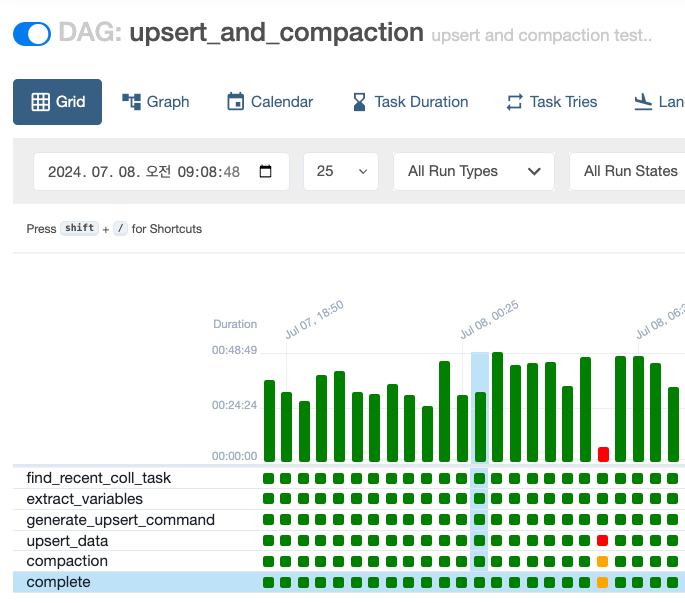
airflow job 현재 내 잡은 이렇게 되어 있고, 실패시 알림을 받고 있다.

airflow task 실패시 알림 task 명과 내가 받은 알림의 task가 다른 예시용이니 참고 바란다.
[태스크 상세] 버튼을 누르면 airflow log로 한 번에 이동할 수 있다.
이제부터 airflow - slack 설정하는 방법을 알아보자.
Airflow 설정

Airflow UI > Admin > Connections 에 들어가 connection을 위한 정보를 입력
Webhook Token은 본인이 만든 slack api에서 볼 수 있다. (https://api.slack.com/apps)
Slack Alert Class
from airflow.providers.slack.notifications.slack_webhook import SlackWebhookNotifier
from urllib import parse
import pendulum

class SlackAlert():
    def __init__(self, webhook_conn_id):
        self.webhook_conn_id = webhook_conn_id
        self.airflow_url = "http://xxx.xx.xx.xx:xxxx/dags"
        self.local_tz = pendulum.timezone("Asia/Seoul")

    def send_slack_webhook_notification(self, context):
        ti = context['task_instance']

        dag_fail_slack_webhook = SlackWebhookNotifier(
            slack_webhook_conn_id = self.webhook_conn_id,
            text=f"{ti.dag_id} > {ti.task_id} 실패",
            blocks=[
                # 메인 타이틀 + 메세지
                {
                    "type": "section",
                    "text": {
                            "type": "plain_text",
                            "text": f"{ti.dag_id} > {ti.task_id} 실패"
                            },
                    "accessory": {
                        "type": "button",
                        "text": {
                            "type": "plain_text",
                            "text": ":red_circle: 태스크 상세",
                            "emoji": True
                        },
                        "value": "go_task",
                        "url": f"{self.airflow_url}/{ti.dag_id}/grid?dag_run_id={parse.quote(ti.run_id)}&task_id={ti.task_id}",
                        "action_id": "button-action"
                    }
                }
            ],
            attachments=[
                    # 실패 태스크의 상세 정보
                    {
                        "color": "#FD8B2D",
                        "fields": [
                            {
                                "title": f"{ti.task_id} (state: {ti.state}) 상세 Logs 내용을 확인해 주세요.",
                                "value": f"""시작 시간 : {pendulum.instance(ti.start_date).in_timezone(self.local_tz).strftime('%Y-%m-%d %H:%M:%S')}""",
                                "short": False
                            }
                        ]
                    }
                ]
        )
        return dag_fail_slack_webhook.notify(context)
slack alert를 위한 간단한 클래스를 작성하였다.
여기서 눈 여겨봐야할 점은
1. 서버에 따라 서버시간이 다르므로 나는 pendulum 라이브러리를 사용해 지역 시간을 설정
2. ti.log_url을 사용하면 localhost로 불려지기 때문에, airflow_url을 수동 설정
한 점이다.
추가로 필요한 정보가 있다면 context 내에서 정보를 꺼내써도 된다.
Python 호출
from common import SlackAlert

# 본인이 설정한 conn_id 입력
slack_alert = SlackAlert('slack_ir_monitoring')

default_args = {
	...,
	'on_failure_callback' : slack_alert.send_webhook_notification
    }

with DAG(
	job_name,
    default_args = default_args,
    ...
    ) as dag:

    task1 = ..
    ..
이렇게 설정하면 task 실패시, slack으로 알림이 오는걸 확인할 수 있다.
물론, task 성공시에도 알림을 받을 수 있는데 default_args내 on_success_callback 인자에 비슷하게 구현하면 된다.
나는 배치 주기가 짧아 실패시에만 알림을 받고 있다.